
Line crossings
Detect when a person or vehicle crosses a defined line. Place crossing lines in the camera view to monitor entrances and other boundaries that matter to your operation.
Turn existing CCTV cameras into an active monitoring system. AI detects and tracks activity on site, while the Hamatics Vision mobile app brings you event notifications, video clips, and camera status. A visual configurator puts zones, lines, and monitoring rules in your hands.
Talk to us about Hamatics Vision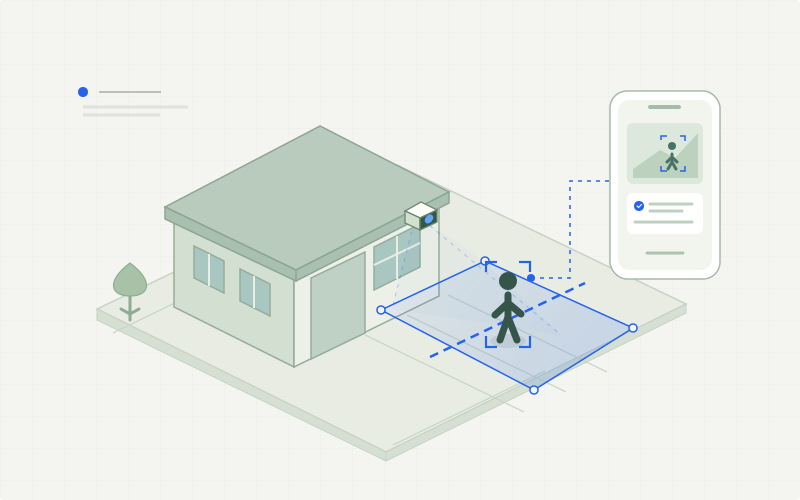
One platform. Three connected components: an AI edge device, the Hamatics Vision mobile app, and a visual configurator.
Choose the areas and activities that need your attention. Detection and tracking turn camera footage into events based on the zones, lines, and rules you configure.
Detect when a person or vehicle crosses a defined line. Place crossing lines in the camera view to monitor entrances and other boundaries that matter to your operation.
Follow movement into and out of selected areas. Human and animal detection also supports configured zone-entry or line-crossing events around homes and other monitored spaces.
Receive an alert when a person or object remains in an area longer than the time you define. Set dwell times and thresholds to reflect the situation you want to monitor.
Get notified when activity is detected in an area that should remain clear. Define the zone and event rules around the needs of your site.
The edge device analyzes the video, the configurator defines what to look for, and Hamatics Vision brings the event to your phone.
Detection, tracking, and real-time event analysis run close to the cameras on an on-site device.
Receive event notifications and review what happened from your phone. A short video clip can accompany an alert to give it context.
Draw, configure, and monitor without complex programming. Adapt monitoring to the environment through a visual interface.
Connect the on-site AI device to the existing camera setup and choose a model configuration suited to the available hardware.
Draw zones and lines in the configurator, set event rules and dwell thresholds, and start monitoring.
AI models detect and track relevant objects in the video, identifying events against the rules you have defined.
Receive the notification in Hamatics Vision, open the event clip, and check camera status or basic activity statistics.
Configure monitoring around the areas that matter at each location, from a home entrance to a warehouse or production floor.
Define zones around a home and lines at entry points to identify people or animals entering the areas you choose.
Monitor line crossings, zone entry and exit, or extended presence in selected retail areas. Review activity across locations in the mobile app.
Define rules for operational zones, vehicle crossings, and areas that should remain clear, with event clips available for review.
No. Detection, tracking, and event analysis run on the edge device at the site, so the analysis does not require continuous video transmission to the cloud. Event notifications and associated clips are delivered to the Hamatics Vision mobile app for review.
The platform supports different AI model configurations. The visual configurator lets users select the model level to balance performance, accuracy, and the requirements of the installed hardware.
Yes. Use the visual configurator to redraw zones and lines, adjust event rules and dwell thresholds, manage camera settings, or start and stop monitoring without changing the underlying software.
Hamatics Vision is the mobile app within the HAMATICS VISION platform. It brings together event notifications, short video clips, camera health and offline status, basic statistics, and monitoring across multiple locations.
Tell us about your operation. We’ll help you find where computer vision can make a practical difference.